

HP OfficeJet 4215 and and Airport Extreme or Airport Express Printing using 10.4
The HP OfficeJet 4215 does not work with the Airport Express/Airport Extreme Base Station with HP's newest printer drivers, though initial reports indicate it does work fine with the older HP drivers.
It will work with the HPIJS driver, direct link to HPIJS 4215 guide.
Regardless you will only be able to print via an Airport base station.
This guide is for 10.4, please follow this generic guide if you are running 10.3.
Open Printer Setup Utility in the Utilities folder in Applications.
You will now be faced with a new window (you may already have printers listed).
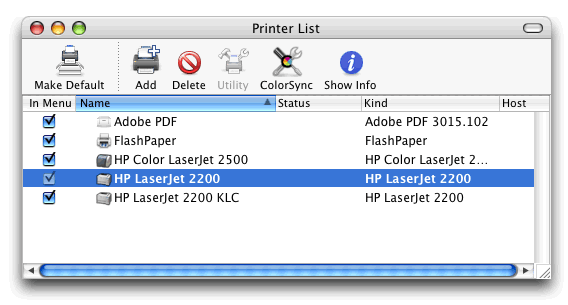
Click the Add button.
When you start Printer Setup Utility to the right of Default Browser in 10.4 is an icon called IP Printer. Click this icon.
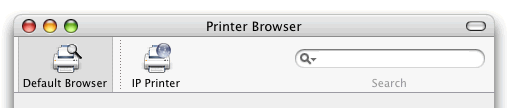
If necessary change the dropdown box from Rendezvous (or USB or whatever) to IP Printing.
You should now see this window.
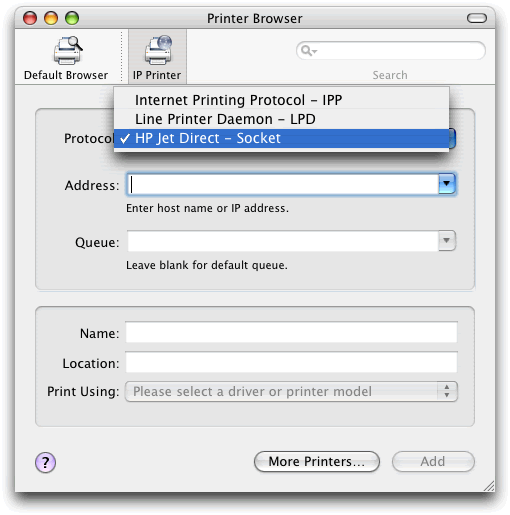
Change Printer Type to Socket/HP Jet Direct.
Add the IP address as 10.0.1.1 (assuming your Airport Express is at its default IP address).
Select the relevant HPIJS HP OfficeJet 4215 printer driver.
Note this HP Page if you have a HP PhotoSmart or All-in-One printer.