

Printing from a Windows XP PC to a printer attached to an Airport Extreme Base Station or Airport Express using Bonjour
The following process is used in printing from an XP PC to a printer which is connected to the USB port of the Airport Extreme Base Station (AEBS) or Airport Express (AX) using Bonjour, you will need to download Bonjour for Windows (link is on the righthand side)
This process will also work for other Bonjour networked printers.
Download and install Bonjour for Windows.
You will need to find the Bonjour Printer Wizard which is usually installed onto the Desktop (and not on the Start Menu).

If not you can find it in the main Program Files area of the computer which will usually reside in C:\Program Files\Bonjour
Double click PrinterWizard.exe

Click Next, you should be then be presented with a list of Bonjour Printers.
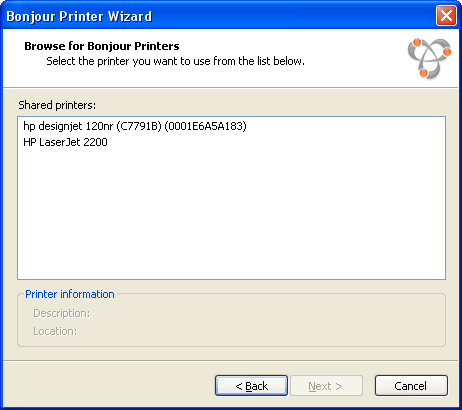
Select the printer you wish to use.

Click Next
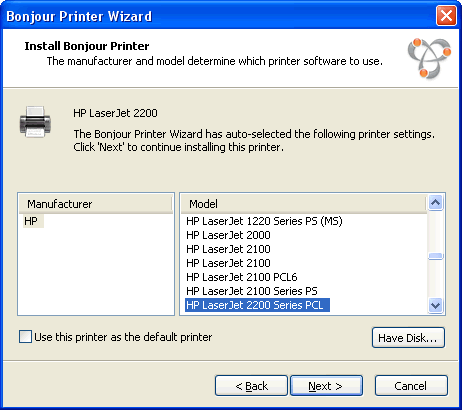
Select the printer type and model (or use the Have Disk... if applicable), in this example I am using a HP LaserJet 2200.
If you are having problems with finding the correct Printer Driver when using this method, please refer to Problems with finding Printer Driver when using printer connected to Airport Extreme or Express
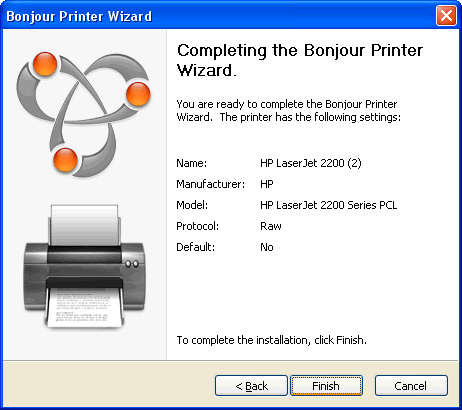
Click Finish